Draft — being checked against the app
Working callbacks
Record that a patient wants a call back to book, then contact them and book or close the request.
A callback is a patient asking the practice to ring them back to book. The same list doubles as a waiting list. Callbacks can come from staff, from a patient asking for a call on the online booking page, or from someone joining the waitlist.
Creating a callback
- Open the patient's record, open the 'More' menu and choose 'Request callback'.
- In 'Request a callback', enter the patient's preferred date, time of day and any notes.
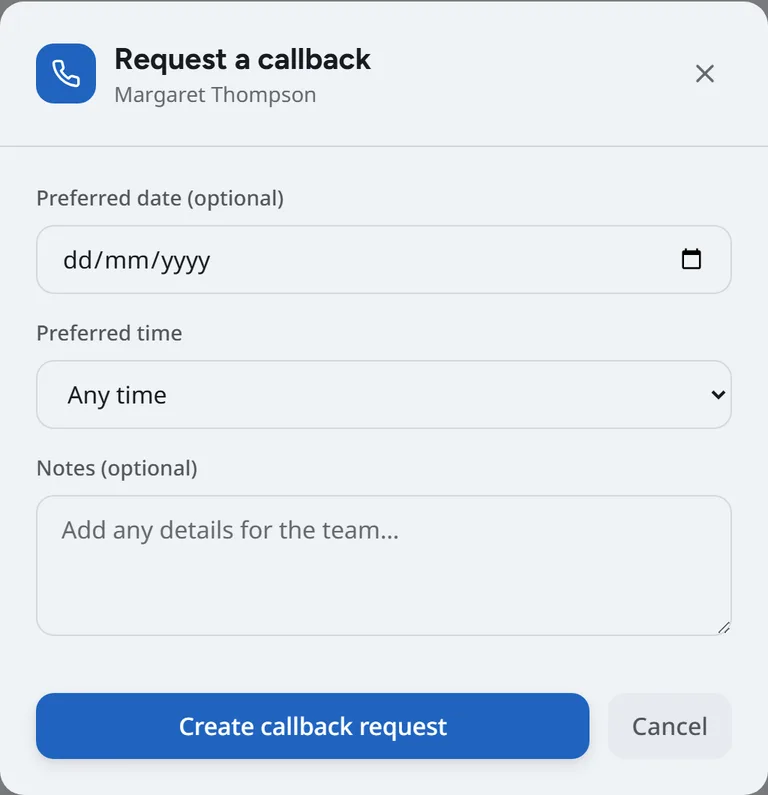
- Choose 'Create callback request'.
Working the list
Open the 'Callbacks' tab on the 'Reception' screen. Each row is a patient waiting to hear from you, with 'Book', 'Contact' and 'Link' buttons.
- Choose 'Contact' when you ring the patient. In 'Contact Patient', record the 'Contact Method' and your 'Contact Notes'.
- Set the 'New Status': 'Contacted' if you spoke to them but did not book, 'Scheduled' if they booked, or 'Cancelled' if they no longer need it. Add 'Resolution Notes' if useful.
- To book straight away, choose 'Book'. Booking from a callback marks it scheduled for you.
'Link' connects a callback to a patient record, for example when the request came from the online booking page and the patient is already on file.
Statuses
- Pending and contacted callbacks are still open and stay on the list.
- Scheduled and cancelled callbacks are finished.
Reminders that did not reach the patient
The 'Callbacks' tab also lists 'Reminders that did not reach the patient'. Call these patients to remind them yourself and correct their contact details.